

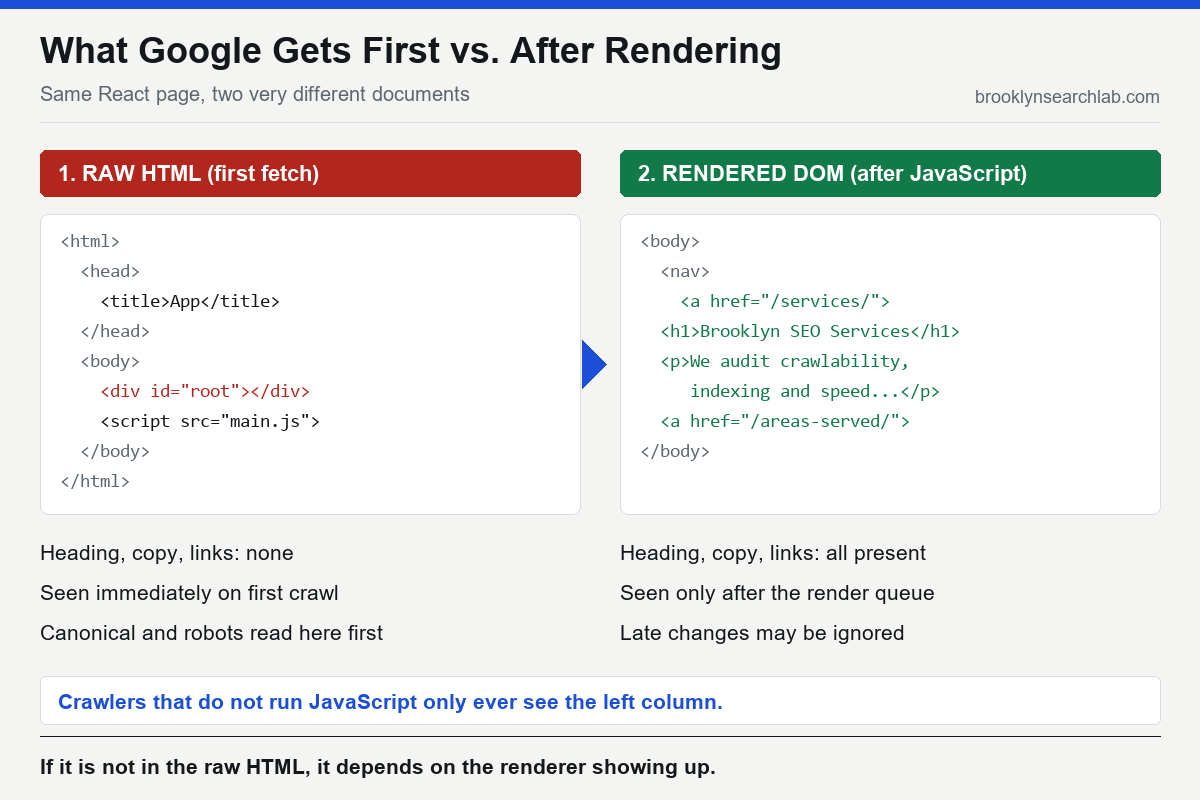
Open your React or Next.js site in Chrome, right-click, and choose “View page source” — not Inspect, View source. If what you see is a nearly empty <div id="root"></div> and a handful of script tags, you are looking at what a crawler receives first, before any JavaScript runs. Your pricing, your service descriptions, your location pages: none of it is in that document. It only exists after a browser downloads, parses, and executes your bundle. Google can do that work, but it does it later, separately, and with conditions attached. Whether your site is visible or invisible depends entirely on whether those conditions are met.
That is the real shape of JavaScript SEO. The question is not “can Google read JavaScript?” — it can. The question is what happens to your pages in the gap between the first fetch and the finished render, and which of your pages fall into it. This post walks through how that gap works, why it hurts more in a market as competitive as New York City, and how to check your own site in about fifteen minutes.
How Google actually processes a JavaScript page
Google’s own JavaScript SEO basics describes three phases: crawling, rendering, and indexing. Googlebot fetches the URL and reads the raw HTML response. If the page is allowed to be indexed, it is placed in a queue for rendering, where a headless Chromium executes the JavaScript and produces the final DOM. Only then does Google index the rendered content and discover any links that the scripts generated.
Two details in that sequence cause most of the damage. First, the render queue is not instant. Google says pages may sit in it for seconds, but it does not promise a timeline, and it does not render everything it crawls. Second, anything your page needs from the raw HTML — the canonical tag, the robots meta tag, the status code, the internal links — has to be right before rendering, because that is the version Google sees first. A noindex that is present in the initial HTML and removed by JavaScript can stop the page from ever reaching the renderer at all; Google’s guide to fixing search-related JavaScript problems warns about exactly this.
Where JavaScript sites quietly go invisible
Almost none of these failures show up as an error. The site loads fine for humans, Search Console shows no alarm, and the pages simply never rank. These are the patterns we find most often.
Content that needs a user action. Googlebot does not click, scroll, or hover. Text loaded after a button press, an accordion that fetches its content on open, or a “load more” list that never exposes the next page as a real link will not be seen. Anything that matters for ranking has to be in the DOM on load.
Links that are not links. Google follows <a href> elements. It does not follow an onClick handler on a div or a button that calls a router function. Google’s link best practices say this plainly, and it is the single most common reason a whole section of a single-page app is never discovered: the navigation works for people and is invisible to the crawler.
Soft 404s. A client-side router that serves a “page not found” screen with a 200 status tells Google the page exists. Thousands of those can fill the index with empty pages and drain attention from real ones, which is a crawl budget problem wearing a framework costume.
Metadata set after load. Titles, meta descriptions, and canonical tags injected by a client-side library often arrive too late or get overwritten. The raw HTML says one thing, the rendered DOM says another, and Google has to guess which to trust. When canonicals disagree between the two, the result is the ranking split we covered in the canonical tag mistake that splits rankings.
Blocked resources. If robots.txt disallows the JavaScript or API endpoints your page needs to render, Googlebot sees the broken version. This is a leftover from older advice that told developers to block /static/ or /api/, and it still turns up on sites that have been migrated more than once.
Why it costs more in New York
A JavaScript rendering delay is a small tax in a quiet market and a real one in a crowded one. A restaurant group, law firm, or retailer in Manhattan is competing against sites that were server-rendered and fully indexed years ago. If your new service page waits in a render queue while a competitor’s identical page was indexed on first fetch, they hold the position by the time yours appears.
The local angle matters too. Businesses that serve specific neighborhoods usually publish many near-identical pages — one per borough, one per service. On a client-rendered site, those pages all share the same empty shell in the raw HTML, which makes them look like duplicates until rendering finishes. That is part of why Brooklyn and Manhattan location pages need distinct, crawlable HTML of their own, not one template that fills in later.
There is also a newer reason. Many AI-powered search and answer tools run their own crawlers, and several of them are reported not to execute JavaScript at all. If your content only exists after rendering, a retrieval system that reads raw HTML may never see it. Check each vendor’s published crawler documentation rather than assuming, but do not build a strategy that depends on every crawler rendering the way Googlebot does.
What you can control
Choose a rendering strategy on purpose
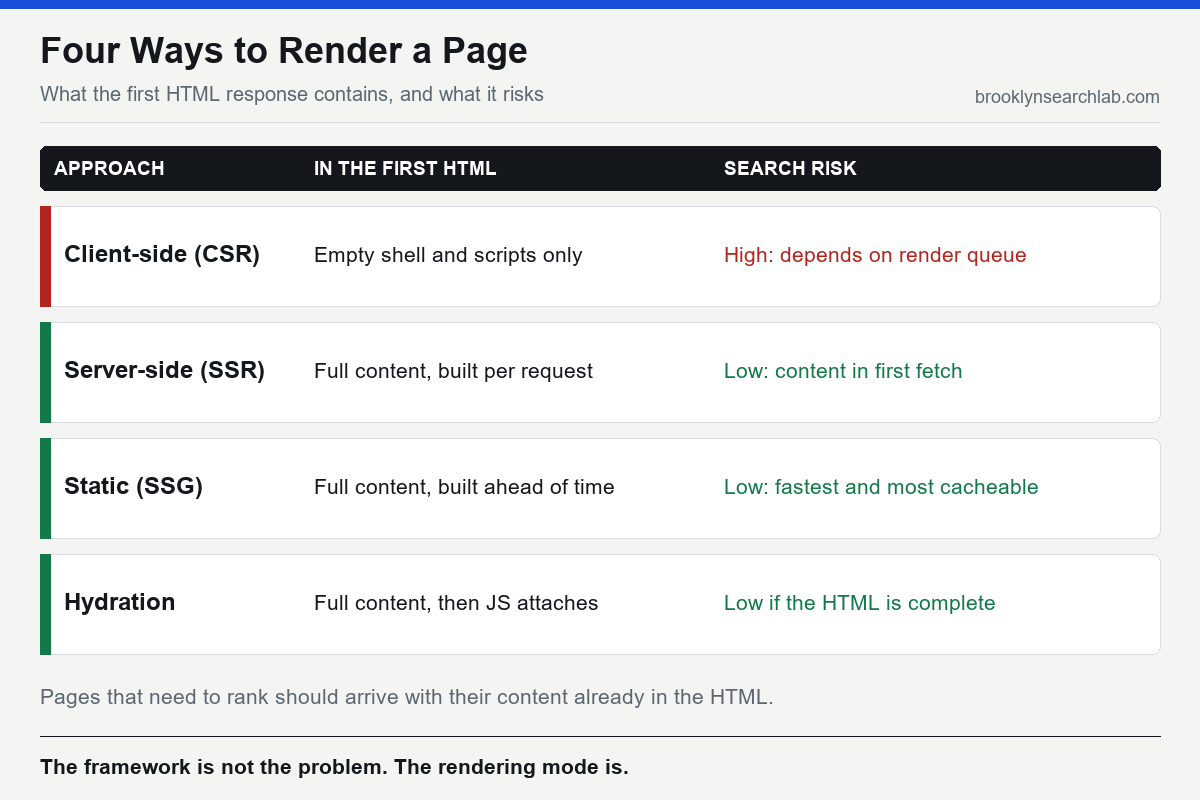
Google’s engineering guidance on rendering on the web lays out the trade-offs. Pure client-side rendering ships an empty shell and builds everything in the browser. Server-side rendering builds the HTML on each request. Static generation builds it ahead of time. Hydration sends finished HTML and then attaches JavaScript to make it interactive. For pages that need to rank, the HTML that arrives first should already contain the content, which is why server-rendered or statically generated pages are the safer default. Next.js supports both, which is the point: the framework is not the problem, the rendering mode you left it in is.
Put the important things in the first response
Title, meta description, canonical, robots directives, headings, body copy, and primary navigation links should all be present in the raw HTML. A good test is to disable JavaScript in your browser and reload: whatever disappears is what a non-rendering crawler cannot see.
Use real links and real status codes
Every internal link should be an <a href="/real/path/">. Every missing page should return an actual 404, and every removed page a 410 or a redirect. These are server decisions, and they are the cheapest fixes on this list.
Watch what rendering does to speed
Heavy bundles do not only delay indexing, they delay the paint. Largest Contentful Paint and Interaction to Next Paint are both affected by how much JavaScript has to run before the page is usable, and web.dev’s INP guide explains why long tasks on the main thread are the usual culprit. We covered the measurable cost in how a six-second load time suppresses NYC organic traffic and in what actually moves Core Web Vitals.
The strategic turn: this is an engineering problem, not an SEO tweak
Here is the part most SEO advice avoids. You cannot fix a client-rendered architecture with a plugin or a meta tag. If the application was built to render everything in the browser, getting indexable HTML out of it means changing how the application renders, which is a software decision made by whoever owns the codebase. An agency that only audits will hand you a list of symptoms; the cure lives in the repository.
That is why we treat technical SEO and software development as one job, and why a redesign that ignores rendering can undo years of ranking work. If you are rebuilding on a modern framework, bring the SEO requirements into the first sprint rather than the last, and make sure web design and engineering are working from the same crawlability checklist. An audit with real numbers will tell you which pages are affected; only a code change will fix them.
- Google can render JavaScript, but it does so after the first crawl, in a queue, and only if the raw HTML allows it.
- Canonicals, robots directives, status codes, and links must be correct in the initial HTML, not just the rendered page.
- Links must be real
<a href>elements, and “not found” screens must return a real 404. - Server-side rendering or static generation is the safer default for any page that needs to rank.
- Fixing rendering is a code change, so the SEO and engineering work have to happen together.
What to do this week
- Open three key pages, choose “View page source,” and check whether the main heading and body copy are in the raw HTML.
- Disable JavaScript in your browser, reload those pages, and note everything that vanishes.
- In Search Console, run the URL Inspection tool on each page and compare the “View crawled page” HTML to what you see in a browser.
- Crawl your site with JavaScript rendering turned off and count how many internal links the crawler finds compared with a rendered crawl.
- Check robots.txt for rules blocking script, style, or API paths that your pages need to render.
- Confirm that a made-up URL on your site returns a genuine 404 status, not a 200 with an error message.
Common questions
Does Google index JavaScript sites?
Yes. Google renders JavaScript using an up-to-date Chromium and indexes the rendered content. The risk is not that it cannot, but that rendering happens after the first crawl, depends on the raw HTML being correct, and does not apply to every crawler that might read your pages.
Is Next.js good for SEO?
It can be. Next.js can render pages on the server or generate them statically, both of which put content in the first HTML response. The same framework can also be configured to render entirely in the browser, which gives up that advantage. The mode matters more than the brand name.
How do I see what Googlebot sees?
Use the URL Inspection tool in Search Console and open the crawled page and rendered screenshot, then compare them with View source in your browser. Differences between the raw HTML and the rendered result are where problems hide.
Do I need to rebuild my whole site to fix this?
Not always. Many sites can switch their important routes, such as service and location pages, to server rendering or static generation while leaving logged-in application screens client-side. An audit of which pages need to rank usually narrows the work considerably.
We’ll compare your raw HTML to your rendered pages, check crawlability and indexation, and tell you exactly which templates need to change. Get your free audit
Related: Crawl Budget Explained: Why Google Isn’t Indexing Half Your Product Pages