

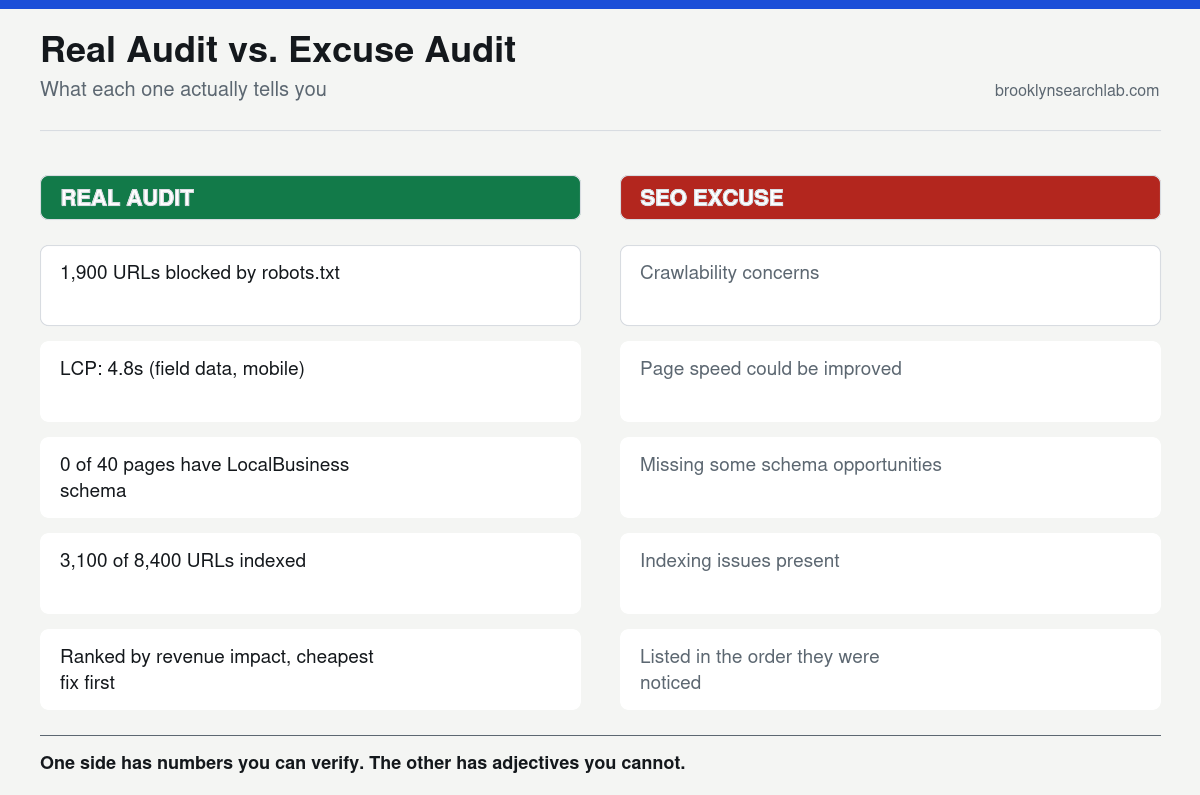
A prospective client emailed us a PDF from their previous SEO vendor titled “Comprehensive Technical Audit.” Forty-one pages. It said their site had “crawlability concerns,” their “page speed could be improved,” and they were “missing some schema opportunities.” Not one number. No list of which URLs Googlebot couldn’t reach, no Core Web Vitals score, no example of the schema that was missing. We ran our own audit on the same site in an afternoon and found 1,900 URLs blocked by a stray robots.txt rule from a 2019 site migration, a Largest Contentful Paint of 4.8 seconds on mobile, and zero structured data on any of their 40 location pages. All three were fixable in under two weeks.
The original document wasn’t wrong, exactly. It just wasn’t an audit. It was a set of vague impressions dressed up as diagnosis — the kind of report that sounds like expertise but gives a client nothing they can act on, verify, or hold anyone accountable to. That’s the real difference between an SEO audit and an SEO excuse: one produces numbers you can check yourself, and the other produces adjectives.
What a real audit actually measures
A real technical SEO audit is a measurement exercise, not an opinion piece. It answers four questions with data, not adjectives.
Crawlability: which URLs can Googlebot actually reach, and what is it doing when it gets there? This comes from server logs and a crawl tool, not a guess — Google’s own SEO Starter Guide is explicit that indexing starts with the crawl, and a crawl that’s silently blocked by a misconfigured robots.txt rule or a chain of redirects never gets past step one.
Indexability: of the URLs Google can reach, how many actually make it into the index, and why not the rest? Search Console’s Page Indexing report gives an exact count in each bucket — indexed, crawled but not indexed, discovered but not indexed — and a real audit reports those numbers rather than a general sense that “some pages might not be indexed.”
Core Web Vitals: not a Lighthouse score run once in a clean browser tab, but field data — what real visitors on real connections actually experienced. Google explains the distinction directly in its page experience documentation: lab data predicts performance, field data reports it. The Chrome UX Report is the source most real audits pull that field data from, and it’s the same dataset Google itself uses to judge whether a page passes. A page can score 98 in a lab test and still fail in the field if real users are on older phones or spotty cellular connections — the gap between the two is often where the real story is, and web.dev’s guide to Largest Contentful Paint is a useful reference for what actually moves that specific number.
Structured data: whether the markup on the page is present, valid, and matches what’s visibly on the page — not just “present.” Schema.org’s own LocalBusiness structured data documentation lists specific required and recommended properties; a real audit checks the page against that list property by property, not against a vague sense that “there’s some schema on there.”
Why the excuse version survives longer in NYC
Vague audits are a problem everywhere, but they last longer in a market like New York City’s because the competitive noise makes it harder for a business owner to tell the difference between a real diagnosis and a plausible-sounding one. A retailer in Manhattan is competing against dozens of well-optimized sites for the same terms, and a slow, thin technical audit can quietly cost them months while a competitor with a genuinely fixed site pulls ahead. A business in Queens or Staten Island, where the local competitive set is smaller, can actually get away with a vague audit for longer simply because there’s less pressure — which means the underlying technical debt has more time to compound before anyone notices.
There’s also a volume problem specific to agencies serving a dense market like NYC: it’s tempting to template the audit process across dozens of clients a month, because a real crawl-log analysis and Core Web Vitals field-data pull takes real time per site, and a templated PDF with swapped-out client names doesn’t. We’ve reviewed prior audits for prospective clients where entire paragraphs were identical to audits we’d seen from the same vendor for a completely different business in a different borough, with a different site, a different CMS, and a different set of actual problems. The findings were generic because the process behind them was generic.
The other local wrinkle is multi-location structure. A five-borough business has to get the audit right per location, not just once for the domain — the crawlability and indexation problems on a Brooklyn location page are frequently different from the ones on the same client’s Manhattan page, because each was built or migrated at a different time by a different vendor. A single, generic sitewide audit misses that entirely.
What you can control before you hire anyone
Check crawlability yourself in ten minutes
Search Console’s Page Indexing report is free and already running on your site if you’ve verified ownership. Pull the “Crawled, currently not indexed” and “Discovered, currently not indexed” counts — both buckets exist because Googlebot, described in Google’s own Googlebot overview, visited the URL and made a decision your last audit may never have mentioned. If either bucket holds a meaningful share of your site, that’s a real, specific finding you can hand to any agency and ask them to explain — not a vague concern, a number.
Pull your own field data
PageSpeed Insights reports both lab and field data for any public URL, for free, in under thirty seconds. If the field data section says “not enough data,” your site doesn’t get enough traffic for Google to have a Core Web Vitals judgment on it yet, which is itself useful information. If it does have data and the scores are poor, ask any auditor to show you the specific field numbers — Largest Contentful Paint in seconds, not a letter grade.
Validate your schema against the source, not a plugin’s claim
Most SEO plugins insert schema automatically and report that it’s “active.” Active is not the same as valid or complete. Run your actual page URL through a structured data testing tool and compare the output against schema.org’s own property list for your business type. Gaps here are common and cheap to fix once someone actually looks.
Ask what happens after the findings
The most telling question you can ask a prospective SEO vendor isn’t “what will you find” — it’s “how will you decide what to fix first.” A real audit ranks findings by effort versus impact and ties each one to a business outcome. An excuse audit lists everything it noticed in the order it happened to notice it.
The part most audits skip entirely
Here’s what separates a genuinely useful audit from a merely accurate one: prioritization tied to the pages that actually make money. A forty-item findings list with no ranking is barely more useful than the vague version, because the client still has to guess what to fix first. We’ve inherited “thorough” audits from other agencies that correctly identified real problems — a six-second load time that was quietly suppressing a client’s organic traffic, or a canonical tag misconfiguration splitting rankings across near-duplicate URLs — and then buried the fix on page 30 of a PDF, ranked no higher than a missing alt tag on a blog image from 2021.
The strategic move a real audit makes is connecting the technical finding to the revenue page it’s actually hurting. A crawl budget problem matters more on a site with thousands of product or location pages competing for the same limited crawl than it does on a twelve-page brochure site. A Core Web Vitals failure on a location page that’s supposed to be capturing local map pack traffic through a business’s Google Business Profile listing matters more than the same failure on an archived blog post nobody links to. Ranking findings against what they actually cost the business, in traffic or revenue terms, is the step that turns a list of accurate observations into something a business owner can actually act on this quarter instead of eventually.
- A real audit reports numbers — crawlable URL counts, indexed percentages, field-measured Core Web Vitals, specific schema gaps. An excuse audit reports adjectives.
- You can verify crawlability, field performance data, and schema validity yourself, for free, before paying anyone to tell you about them.
- NYC’s competitive density and multi-location business structure make vague, templated audits both more damaging and easier to get away with for longer.
- The highest-value part of any audit isn’t the findings — it’s the prioritization that ties each finding to the revenue page it’s actually costing.
What to do this week
- Pull your Page Indexing report in Search Console and note the “crawled, not indexed” and “discovered, not indexed” counts.
- Run your three highest-traffic pages through PageSpeed Insights and record the field data Largest Contentful Paint, not just the lab score.
- Test your homepage and one location page through a structured data validator and compare the output against schema.org’s property list for your business type.
- If you have a past audit sitting in a folder somewhere, reread it and count how many findings include an actual number versus an adjective.
- Ask any agency you’re evaluating to show you a redacted sample audit and specifically how they prioritized the findings.
Common questions
How long should a real technical SEO audit take?
For a site under a few hundred pages, a genuine audit — crawl, log analysis, Core Web Vitals field data, schema validation, and prioritization — typically takes several days to a week of focused work, not an afternoon of running a single automated tool and exporting its default report.
Can an automated tool alone produce a real audit?
Automated crawlers are a necessary input, not the whole process. They’re excellent at surfacing broken links, missing tags, and duplicate content at scale, but they can’t tell you which of those findings actually matters to your specific business, your specific pages, and your specific revenue. That judgment is the part a template can’t do.
What’s a reasonable number of findings in a real audit?
There’s no fixed number — a badly maintained large site can genuinely have a hundred findings, and a well-run small site might have five. What matters is whether each one is specific and ranked, not the total count. A short list of ranked, verifiable findings beats a long list of generic ones.
Should I be worried if my last audit had no numbers in it at all?
Yes, worth a second opinion. A completely numberless audit — no indexed page count, no Core Web Vitals figures, no specific URLs — is a strong signal the work behind it was templated rather than actually run against your site.
We’ll run a free technical audit with the actual numbers — crawlability, indexation, Core Web Vitals field data, and structured data — ranked by what’s actually costing you traffic. Get your free audit
Related: Crawl Budget Explained: Why Google Isn’t Indexing Half Your Product Pages