

A Garment District wholesaler came to us convinced their site was broken. They had 8,400 product pages in their sitemap. Google Search Console showed 3,100 indexed. The other 5,300 weren’t blocked, weren’t noindexed, weren’t duplicates in any way their team could find — they were just sitting in “Discovered, currently not indexed” and “Crawled, currently not indexed,” month after month, invisible to anyone searching for them.
Nothing was broken. Google had visited the site, decided how much of it was worth crawling, and spent that budget somewhere else.
What crawl budget actually is
Crawl budget is the number of URLs Googlebot is willing and able to fetch from your site in a given window. It is set by two things working together: crawl capacity limit, which is how much load your server can take before Google backs off, and crawl demand, which is how much Google wants to see your pages based on their popularity and how stale the current index looks. Google’s own documentation on crawl budget management is direct about who this applies to: sites with roughly 10,000+ unique URLs where new pages are discovered inconsistently. Below that, most sites get crawled thoroughly enough that budget is a non-issue. Above it, budget becomes the ceiling on how much of your catalog can ever rank.
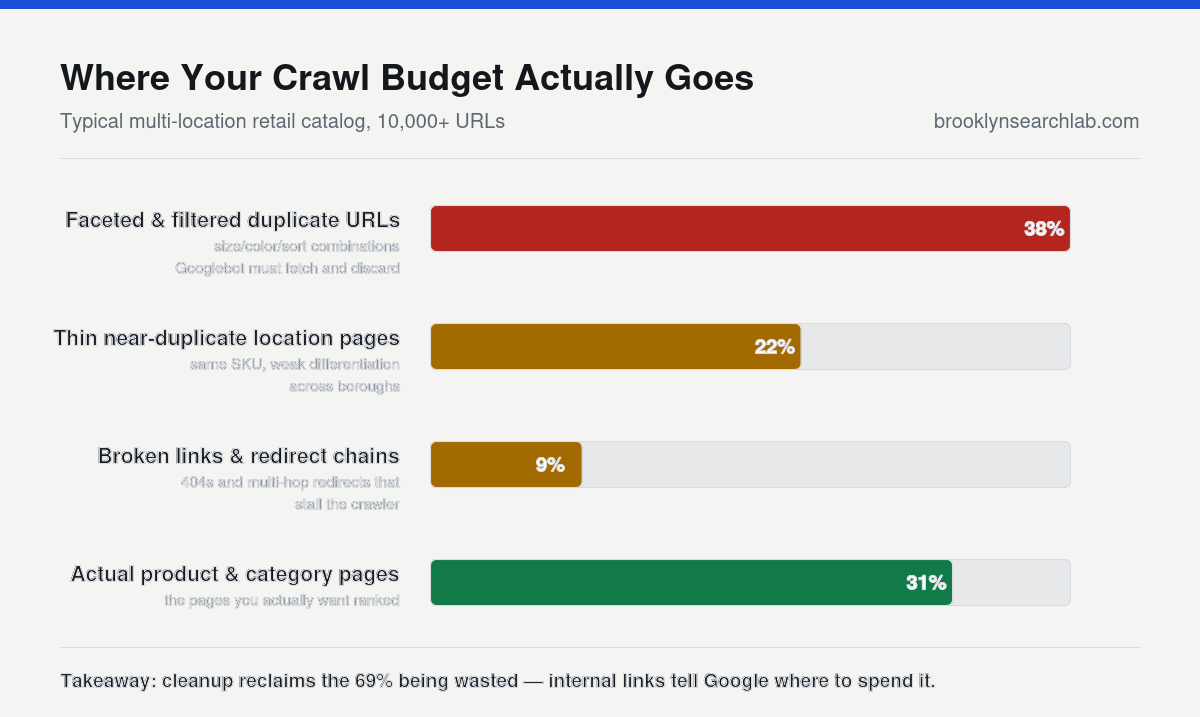
This is the part that trips people up: budget isn’t spent evenly. Googlebot prioritizes URLs it believes are worth the trip. A product page that gets internal links from your homepage, has unique specifications, and changes price weekly reads as worth crawling. A near-duplicate variant page reachable only through a faceted filter reads as a waste of a fetch. When your site generates thousands of the second kind, Googlebot spends its visit on those instead of the pages you actually want ranked — and the pages you want ranked stall in “discovered, not indexed.”
You can watch this happen directly in your own server logs, without waiting on Search Console to catch up. Googlebot identifies itself by user agent string and, more reliably, by a verifiable IP range documented in Google’s own Googlebot overview. Pull a week of raw access logs, filter to genuine Googlebot hits, and group by URL pattern. On a bloated catalog the result is usually lopsided in an obvious way: thousands of fetches against filtered listing URLs and a handful against the product pages that actually carry revenue.
Why this is a bigger problem for NYC catalogs than the guides admit
Most crawl budget advice is written for pure e-commerce with a flat product list. NYC’s mid-size retailers, wholesalers, and multi-location service businesses have a structural problem the generic advice doesn’t cover: their catalogs multiply by geography. A five-borough appliance retailer with inventory pages spanning Queens and Staten Island, a garment wholesaler with size and color variants, a multi-location dealer with the same SKU listed under five different service area URLs — each of those is a legitimate business reason to have more URLs, and each one dilutes crawl demand across near-duplicates that Googlebot has to sort out itself.
We see this constantly comparing Brooklyn and Manhattan catalogs for the same client: the Manhattan location’s higher page authority pulls crawl demand toward it, and the Brooklyn location’s near-identical inventory pages get crawled less often, indexed later, and re-crawled less frequently when prices change. It isn’t favoritism. It’s Googlebot allocating a limited budget toward the URLs with the strongest signals, and multi-location catalogs generate weak, duplicated signals by default.
What you can control
Stop generating URLs Googlebot has to evaluate and reject
Faceted navigation is the single biggest source of wasted crawl budget on retail sites. Every combination of size, color, and sort order that generates a unique URL is a fetch Googlebot has to make, evaluate, and usually discard as a near-duplicate. Canonicalize filtered and sorted variants back to the parent category, and keep the canonical tag pointed consistently — Google’s guidance on URL canonicalization is explicit that inconsistent signals — the same mistake we’ve written about before in the context of rankings splitting across near-duplicate URLs (a sitemap listing one URL while internal links point to another) make Google pick a canonical on its own, and it won’t always pick the one you wanted crawled.
Fix what’s actually consuming the budget, not what looks broken
Server errors and slow responses cost you disproportionately, because Googlebot throttles its own crawl rate when it hits 5xx errors or timeouts — exactly the outcome you don’t want on a large catalog. Google documents this directly in its notes on how HTTP status codes affect crawling: persistent server errors don’t just fail one request, they lower Googlebot’s crawl rate for the whole site until the errors clear. If your product catalog runs on custom middleware or an aging plugin stack, a spike in 500s during a traffic surge can suppress crawling for days after the surge ends — the same underlying weakness we found behind a six-second load time quietly killing one client’s organic traffic.
Tell Googlebot what not to bother with
Internal search results pages, cart and checkout states, tag archives, and filtered duplicates should be disallowed in robots.txt or handled with noindex, not left crawlable “just in case.” Every one of those URLs that Googlebot can reach is competing with your product pages for the same budget. This is the least glamorous fix on the list and the one most sites skip, because disallowing a URL feels like giving something up rather than protecting what matters.
Make the sitemap tell the truth
Your XML sitemap should list exactly the URLs you want indexed — current, canonical, 200-status pages — and nothing else. A sitemap padded with redirected, noindexed, or removed URLs teaches Google that your sitemap is unreliable, and an unreliable sitemap gets crawled less thoroughly over time. Google’s guide to building and submitting a sitemap recommends splitting large catalogs into logical sitemap files (by category or update frequency) specifically so Googlebot can prioritize the ones that change most.
The strategic turn most audits miss
Here’s what almost every crawl budget guide leaves out: fixing the technical waste doesn’t create crawl demand, it just stops destroying it. Demand comes from internal links, external links, and freshness signals — the same signals a straightforward SEO strategy already builds. A product page that’s linked from a category page, a blog post, and at least one other product page reads as more important than an orphaned page three clicks deep, regardless of how clean your robots.txt is. The technical cleanup and the content strategy aren’t two separate projects — the cleanup buys back budget, and the internal linking tells Google where to spend it. Sites that do only the first one plateau at “crawled more often” without ever reaching “ranked.”
- Crawl budget is a real constraint above roughly 10,000 URLs, not a myth — but most sites hit it through duplicate and near-duplicate pages, not because Google is stingy.
- Multi-location and multi-variant catalogs, common among NYC retailers and wholesalers, generate weak duplicate signals across boroughs by default and need deliberate canonicalization.
- Server errors throttle your entire site’s crawl rate, not just the failing URL — this is usually the highest-leverage fix.
- A clean sitemap and disciplined robots.txt reclaim budget; internal linking is what tells Google where to spend it.
What to do this week
- Pull your indexed vs. submitted URL count in Search Console and note the gap.
- Check the Crawl Stats report for spikes in 5xx responses or average response time over the last 90 days.
- Audit your top category pages for faceted URL parameters that aren’t canonicalized.
- Confirm your sitemap only lists 200-status, canonical, indexable URLs — remove everything else.
- Add internal links from your highest-authority pages to the product or location pages stuck in “discovered, not indexed.”
Common questions
How do I know if crawl budget is actually my problem?
Compare your total indexable URL count against the “Crawled, currently not indexed” and “Discovered, currently not indexed” counts in Search Console’s Page Indexing report. If those two buckets hold a meaningful share of your catalog and the pages in them aren’t thin or duplicate content, budget allocation is a likely cause.
Does a bigger server plan fix crawl budget?
It can raise your crawl capacity limit if slow response times were the bottleneck, but it does nothing for crawl demand. A fast site with no internal links to its deep pages will still get under-crawled.
Do multi-location businesses need separate URLs for each borough?
Usually yes, if the locations have genuinely different inventory, staff, or service details — that’s real content, not duplication. The problem isn’t the separate URLs, it’s when they’re near-identical and compete with each other for the same crawl demand instead of being clearly differentiated and internally linked.
We’ll run a free crawl and indexation audit and show you exactly where your budget is going. Get your free audit
Related: The Map Pack Ranking Factors Nobody Tells Small Business Owners About