
A Queens HVAC company asked us why their organic traffic had been flat for eight months while their rankings had barely moved. The rankings really had barely moved: position 4 for their main service term, position 3 for two others, and the map pack in three neighbourhoods. On paper this was a site that should have been growing. The first thing we pulled was not a rankings report. It was the field data, and the 75th percentile Largest Contentful Paint on mobile was 6.1 seconds.
Their developer had run Lighthouse the week before and scored 92.
Both numbers were correct. They were measuring different things, and only one of them was measuring customers.
Six seconds is a field measurement, not a lab score
A Lighthouse run is a laboratory test. It loads your page once, on one device profile, over a simulated network connection, usually from a machine sitting very close to your server. It is a useful diagnostic and a terrible estimate of what your visitors experience.
The number that matters is the field number. The Chrome User Experience Report collects real loading measurements from real Chrome users who have opted into reporting, aggregates them over a rolling 28-day window, and publishes the 75th percentile. That percentile is deliberate: it means three quarters of your visits were at least this fast, and it refuses to let a handful of quick loads on office fibre hide the experience of everyone else.
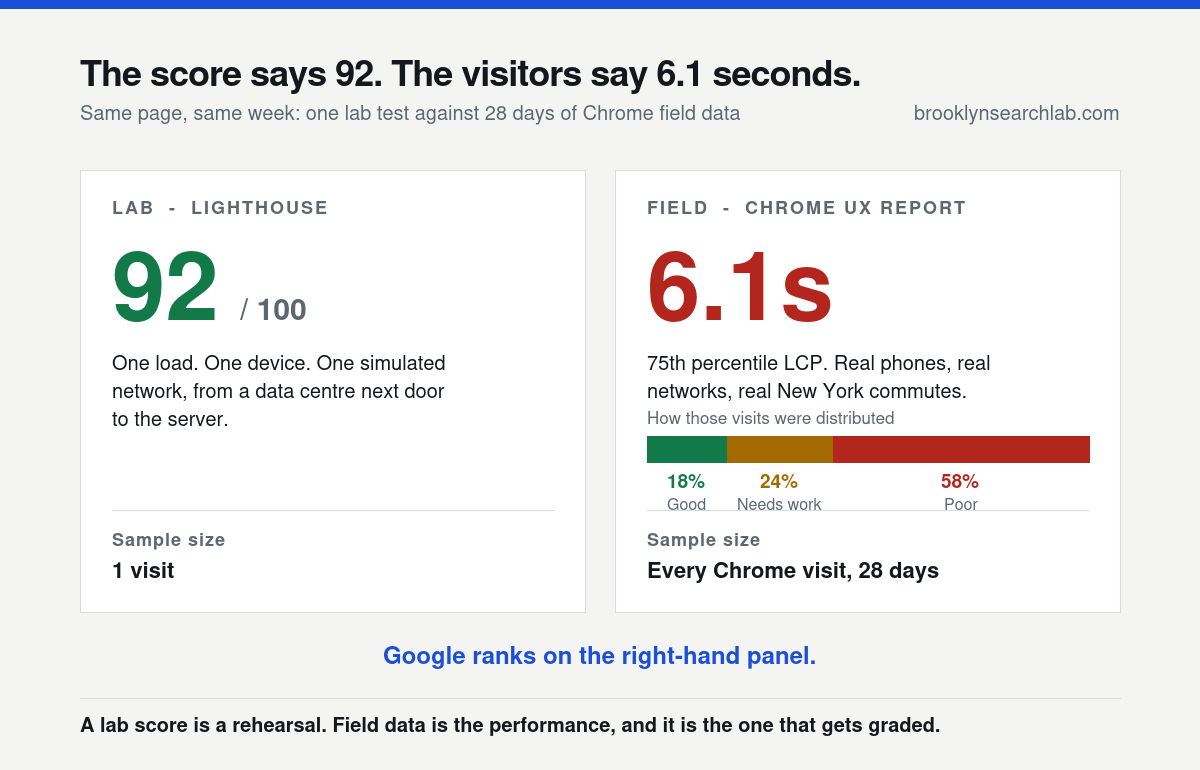
Google’s threshold for Largest Contentful Paint is 2.5 seconds for a good experience and 4 seconds before a page is classed as poor. At 6.1 seconds this site was not near the line. It was at two and a half times the good threshold, with 58 per cent of its real visits landing in the poor band.
A ninety-second check. Open PageSpeed Insights and enter your busiest mobile landing page. Ignore the score at the top. Look for the panel labelled “Discover what your real users are experiencing” — if that panel is present, those are your field numbers. If it says there is not enough data, your site is below the reporting threshold and you should be reading your own analytics instead.
The ranking penalty is small. The traffic loss is not.
This is where most speed advice oversells itself, and where it then loses the argument with a sceptical business owner who has watched a slow competitor outrank them for years.
Google’s documentation on page experience is careful about this. There is no single speed ranking factor. Core Web Vitals are part of a broader set of page experience signals, and relevance and quality outweigh them. A slow page about exactly the right thing still beats a fast page about nearly the right thing. We made that argument at length in Core Web Vitals in 2026, and nothing since has changed it.
So the Queens company’s rankings had not fallen. That was not the leak.
The leak is what happens after the click. Google’s own summary of why speed matters sets out the pattern: as load time climbs, the probability that a visitor abandons rises sharply, and it rises fastest in exactly the range between three and six seconds. You keep the ranking. You keep the impression. You keep the click. You lose the session.
There is a reporting trap hiding inside this, and it is the reason the problem stays invisible for months. Analytics only fires once the page has executed enough JavaScript to send the event. A visitor who taps back at four seconds, before your tag has loaded, frequently never appears in your reports at all. Search Console shows the click. GA4 never sees the session. The two numbers disagree, everyone assumes attribution noise, and nobody goes looking for the cause. It is the same species of measurement mismatch we unpicked in why Search Console positions disagree with reality.
Why six seconds is a New York number
National averages are not much use here, because the conditions that produce a six-second load are unusually concentrated in this city.
New York search is overwhelmingly mobile and overwhelmingly in motion. People look for a locksmith on a platform at Atlantic Avenue, compare two contractors from the back of a car on the BQE, and check whether a shop is open while walking up Broadway. These are not seated visitors on a stable connection. They are on congested LTE cells at rush hour, in buildings with concrete and steel between them and the tower, or riding out the gap between one station’s wifi and the next.
Density makes this worse rather than better. A cell serving a block in Midtown at 6pm shares its capacity with thousands of devices, and shared capacity behaves nothing like the throttled-but-steady connection a lab test simulates. Device age compounds it again: the phone in a working New Yorker’s pocket is often three or four years old, and an older processor takes longer to parse the same JavaScript your developer tested on a current handset.
The intent makes the abandonment expensive. A “near me” search is usually a decision being made right now, with a competitor one tap away in the same set of results. This is part of why local search in Queens and SEO in Brooklyn reward operational basics a national brand can afford to neglect, and part of why the same strategy performs differently across the river, which we covered in Manhattan versus Brooklyn SEO.
Where the six seconds actually goes
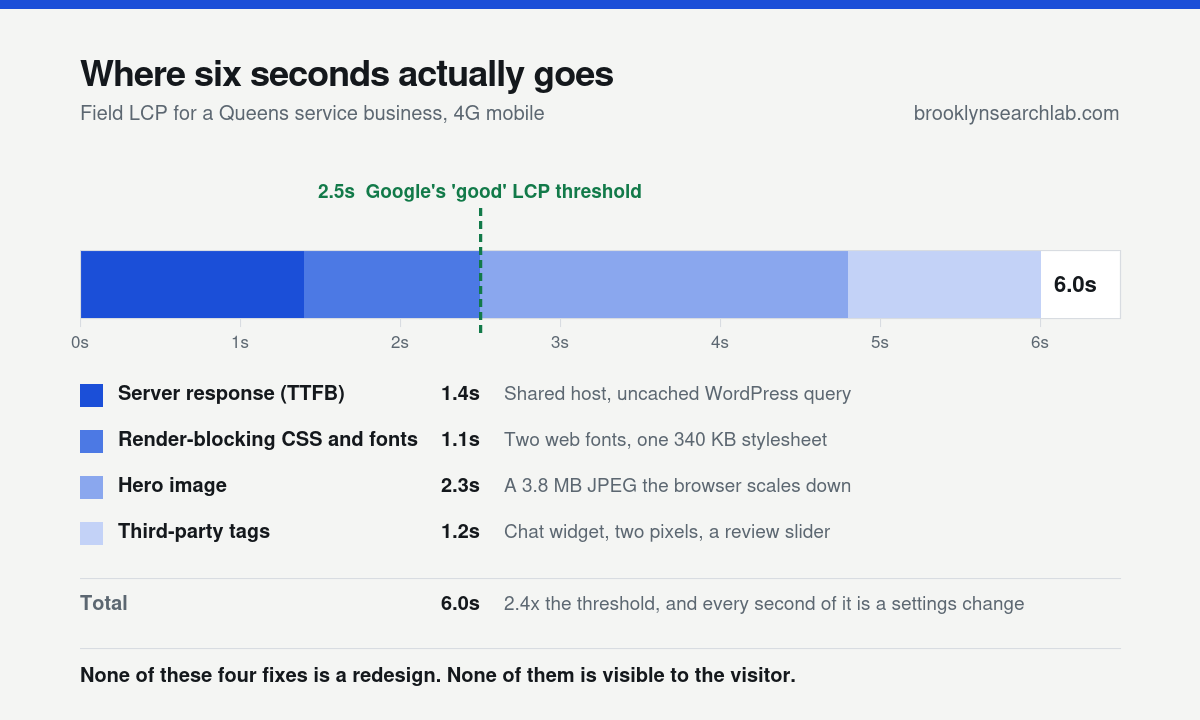
Here is the breakdown from the Queens site. It is unremarkable, which is the point. Nothing in it is exotic and nothing in it required a rebuild to fix.
Server response: 1.4 seconds
Time to first byte is the tax on everything after it, because nothing can start until the first byte arrives. This site was on entry-level shared hosting with no page caching, so every visit ran the full database query set before a single character came back. Caching alone took this under 400 milliseconds.
Render-blocking CSS and fonts: 1.1 seconds
A 340 KB stylesheet, most of it for page templates this site does not use, plus two web font families loading before any text would paint. Browsers hold back rendering rather than show a flash of unstyled text, so a font request the designer forgot about becomes a second of blank screen.
The hero image: 2.3 seconds
The single largest item, and the most common one we find. A 3.8 MB photograph uploaded straight from a camera, displayed at 900 pixels wide, with the browser downloading the full file and scaling it down. Modern formats and correct dimensions are the first recommendation in Google’s guidance on optimising Largest Contentful Paint, and on most sites this one change does more than everything else combined.
Third-party tags: 1.2 seconds
A chat widget, two advertising pixels and a review slider, each loading its own script from someone else’s server. None of them was adding measurable revenue. Each was adding a connection the visitor waits on.
Notice what is not on this list: the design. The layout, the colour palette and the copy contributed nothing to the six seconds. This is the part clients find hardest to believe, because slowness feels like a design problem. It is a delivery problem, which is why a serious web design engagement is mostly decisions about what the browser has to fetch and in what order.
The part most audits leave out: Google crawls at your server’s speed
If the story ended at abandonment, a slow site would simply convert worse. It does something quieter and more damaging than that.
Google’s crawl budget documentation is explicit that crawl rate responds to how fast your server answers. When responses are quick, Googlebot raises its request rate. When they slow down or start returning errors, it backs off, because it is designed not to knock over the sites it indexes.
Follow that through. A slow server does not only lose visitors, it throttles the rate at which your site can be discovered and refreshed. New service pages take longer to appear. Edits take longer to register. A seasonal page published in March is still being picked up in April. The site publishes at the same rate as its faster competitor and accumulates indexed, ranking pages more slowly, and that gap compounds every quarter. The retrieval systems behind AI answers fetch pages too, and they are no more patient than Googlebot, which is one reason AI search optimization starts with delivery rather than with copy.
This is why server response time sits at the junction of three disciplines rather than inside one of them. The fix is rarely a plugin. It is hosting, caching strategy, and often query design, which is why it lands across SEO, software development and, on catalogue or booking sites, the database layer. An agency that only owns the marketing surface cannot fix a 1.4-second time to first byte, and will usually report it as out of scope.
Key takeaways
- Lab scores and field data are different measurements. Lighthouse tests one load; the Chrome UX Report gives the 75th percentile of every real visit over 28 days. Only the second one describes your customers.
- Speed is a weak ranking factor and a strong traffic factor. You keep the position and the click, and lose the session that follows it.
- The loss is under-reported. Visitors who leave before your analytics script runs are never counted, so the damage surfaces as a mismatch between Search Console clicks and GA4 sessions.
- New York conditions are harsher than the lab. Congested cells, older handsets and searches made while moving push field numbers well past national averages.
- Slow servers get crawled less. Googlebot reduces its request rate when responses are slow, so a slow site also indexes new work more slowly.
- It is almost never the design. Hosting, images, fonts and third-party tags account for most of the damage on most sites.
What to do this week
- Get your field number. Run your top three mobile landing pages through PageSpeed Insights and write down the field LCP, not the score. This takes ten minutes and decides whether the rest of this list is urgent.
- Weigh your hero images. Open each key page, right-click the main image, and check the file size. Anything above 300 KB is a problem, and anything above 1 MB is the whole problem.
- Measure time to first byte. If it is above 600 milliseconds, the fix is caching or hosting, and no amount of image work will compensate for it.
- Audit your third-party tags. List every script that is not yours. For each one, name the revenue it produces. Remove the ones with no answer.
- Compare Search Console clicks with GA4 sessions for the same pages and dates. A persistent shortfall on mobile is the abandonment signature.
- Re-measure in 28 days, not tomorrow. Field data is a rolling window, so a fix made today shows up gradually over the following month.
Common questions
Will fixing my load time raise my rankings?
Usually only slightly, and only where you are already close to a competitor on relevance. Expect the gain in sessions and enquiries rather than positions. If someone promises rankings from a speed fix alone, ask them which query and by how much.
My Lighthouse score is 95. Am I fine?
Not necessarily. A high lab score with poor field data is a common combination, and it usually means the lab test is not reproducing your visitors’ devices, networks or cache state. Trust the field panel.
PageSpeed Insights says there is not enough field data for my page. What now?
Your page is below the reporting threshold, which is normal for smaller local sites. Use origin-level data if it is offered, then fall back to your own analytics and compare mobile with desktop engagement on the same pages.
Is a caching plugin enough?
It is often the single biggest improvement available and it is rarely the whole answer. Caching fixes server response for repeat, uncustomised pages. It does nothing about a 3.8 MB image, a blocking font, or a chat widget.
What about INP and CLS?
They matter, and on a site this slow they are usually symptoms of the same causes. Heavy third-party JavaScript drives poor interaction responsiveness, and images without dimensions drive layout shift. Fix delivery first and both typically improve.
How long before the traffic comes back?
Abandonment responds immediately, so session and enquiry numbers can move within days. The field data itself takes the full 28-day window to reflect the change, and crawl rate recovery is gradual after that.
Not sure what your real load time is? Our free technical audit pulls the field data for your key pages, breaks the load down by what is actually costing the seconds, checks your server response and crawl rate, and hands you a prioritised fix list. Five business days, no obligation, and the findings are yours whether you work with us or not.
Request your free technical audit
Related: SEO Services · SEO in Manhattan · Case Studies · Core Web Vitals in 2026