
Try this on your phone. Stand at your shop door, open Google Maps, and search for the service you sell. Write down who shows up first. Then walk fifteen minutes in any direction and search again. In most of the country that exercise produces nearly the same list. In Brooklyn it can produce a different one, because the question Google is answering is not “who is the best in Brooklyn” but “who is the best, closest option to the person holding this phone right now.” A business can be first at one corner and invisible four blocks away without a single thing about its website changing.
That is what makes neighborhood-level search different from the borough-level search most local SEO advice is written for. This post explains how Google handles “near” and neighborhood names, where the usual tactics help, where they backfire, and how to choose which neighborhoods are actually worth pursuing.
How Google decides what “near” means
Google’s own guidance on improving your local ranking says local results are mainly based on relevance, distance, and popularity. Relevance is how well your profile matches what someone searched for. Popularity is how well known you are, drawn from information about your business across the web. Distance, in Google’s words, “refers to how far each business is from the customer who’s searching,” and if the customer does not share where they are, Google uses what it knows about their location.
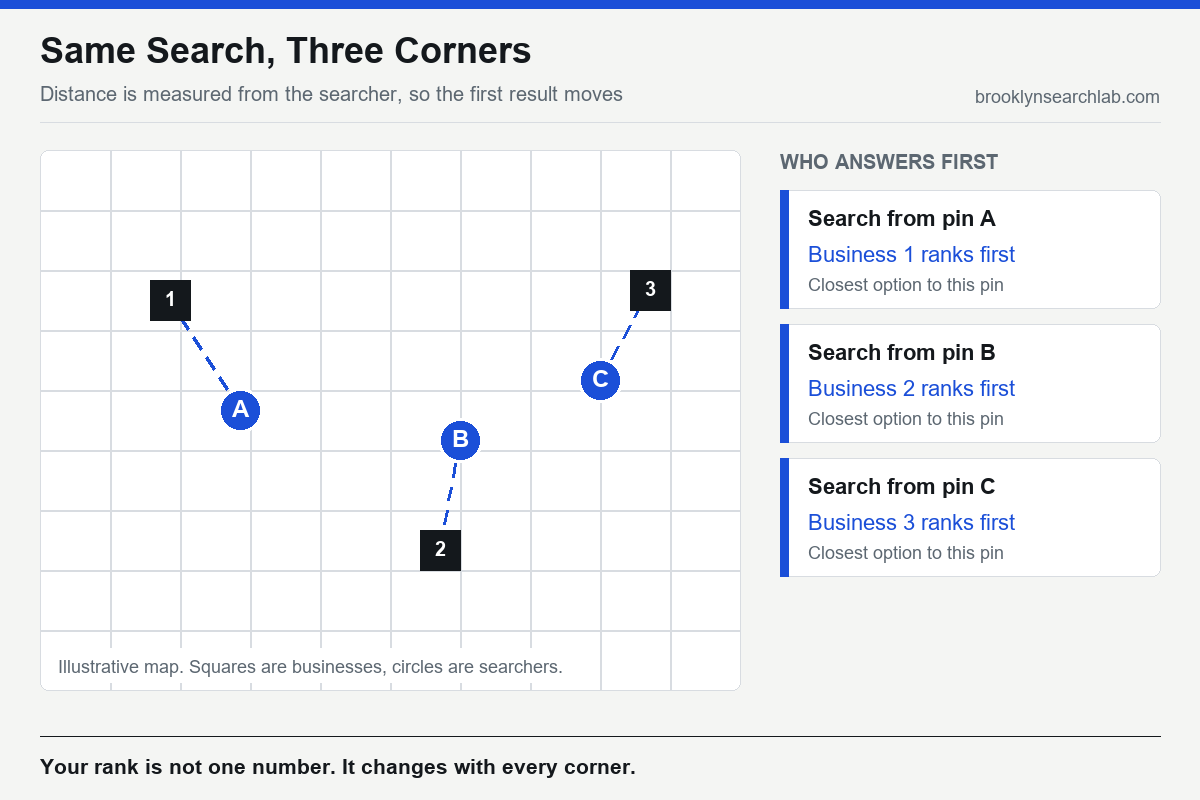
Notice what that does to a search like “electrician” typed with no place name. The searcher’s position becomes the centre of the map. Your business is not competing in “Brooklyn.” It is competing in a shifting circle around a person, and the circle moves every time they do. Our breakdown of the map pack ranking factors goes deeper on why a rank in this system is a surface across the map rather than a single number.
Neighborhoods have names but no borders
People do not search by borough boundary. They type the name they use in conversation: Park Slope, Bushwick, Bay Ridge, Greenpoint. Those names are informal. Their edges are argued over by residents, shift with real estate marketing, and overlap, so a business on a boundary street can reasonably be described by two or three of them.
Google gives you structured ways to describe where you operate, but none of them is a neighborhood. For businesses that travel to customers, Google lets you set up to 20 service areas based on cities, postal codes, or other areas, and says the boundary of your overall area should not be more than about two hours of driving time from where you are based. For a Brooklyn business, postal codes are the cleanest way to be specific, because a ZIP code is unambiguous in a way “the area around Prospect Park” never will be.
A service area is a description, not a ranking lever. If you have a visible storefront address, that address is what Google measures distance from, and listing extra areas does not move the pin. We cover that distinction in service area business versus storefront.
Why Brooklyn makes this sharper than most places
Brooklyn is a borough of separate commercial centres. A customer in Bay Ridge and a customer in Greenpoint share a borough and almost nothing else: different subway lines, different shopping strips, different habits about where they will travel for a service. For many businesses they are two markets that happen to share a name. This is why SEO in Brooklyn and SEO in Manhattan are genuinely different problems, a point we unpack in Manhattan versus Brooklyn SEO.
The practical consequence is that a Brooklyn business with one address is really a neighborhood business, whatever its website says. The honest question is not “how do we rank for Brooklyn” but “which handful of neighborhoods can we credibly win, and what proves it to Google?” The same reasoning carries into Queens and the other boroughs, where a single borough name hides many distinct local markets.
Where neighborhood relevance actually comes from
A real address and a real name
The strongest neighborhood signal you have is the one you cannot fake: where the business actually is. Google’s guidelines for representing your business say your name should reflect your real-world name as used on your storefront, website, and stationery. That rules out the common shortcut of adding a neighborhood to the profile name, such as “Smith Plumbing Park Slope,” unless that is genuinely how the business is known. It is a fast route to a suspension, and it will not outrank a competitor who is physically closer anyway.
Consistent data across the web
Popularity is built from mentions of your business elsewhere, and those mentions only count for you if they agree with each other. If one directory lists your street as “Ave” and another as “Avenue,” or an old suite number lingers on a third, you dilute the signal. Start with NAP consistency, then work through the directories that still matter for NYC businesses.
Reviews that mention real places
Neighborhood words in reviews help, and they cannot be manufactured. You cannot script what customers write, and you should not try. What you can do is ask every customer, make it easy, and make sure the work you do gives them something specific to describe. Reviewers name the street, the building, and the neighborhood when the job happened there.
Markup and on-page details that match the profile
Your site should state the same name, address, and phone number your profile uses, and LocalBusiness structured data lets you express them in a form machines read reliably, including a full postal address. Match the visible text. Google compares them.
All of this is the work covered by Google Business Profile optimization and the wider SEO programme around it.
The neighborhood page trap
The obvious response to all this is to publish a page for every neighborhood: “Plumber in Bushwick,” “Plumber in Williamsburg,” “Plumber in Bay Ridge,” forty pages with a name swapped in. Google has a name for it. Its spam policies define doorway abuse as sites or pages created to rank for specific, similar search queries, and list pages targeted at specific regions or cities that funnel users to one page as an example.
The test is simple. Take a neighborhood page, replace the neighborhood name with another, and reread it. If it still makes sense, it is a template, not a page. A neighborhood page earns its place only when it contains something that could not be written about anywhere else: a real project you completed on that block, how customers there actually reach you, constraints that apply in that part of the city, and reviews from people who live there. For a contractor, for example, whether a building sits in a landmark district can change the permit work involved. A page that says so is useful. A page that says “we proudly serve Bushwick” is not.
The strategic turn: let your customers pick the neighborhoods
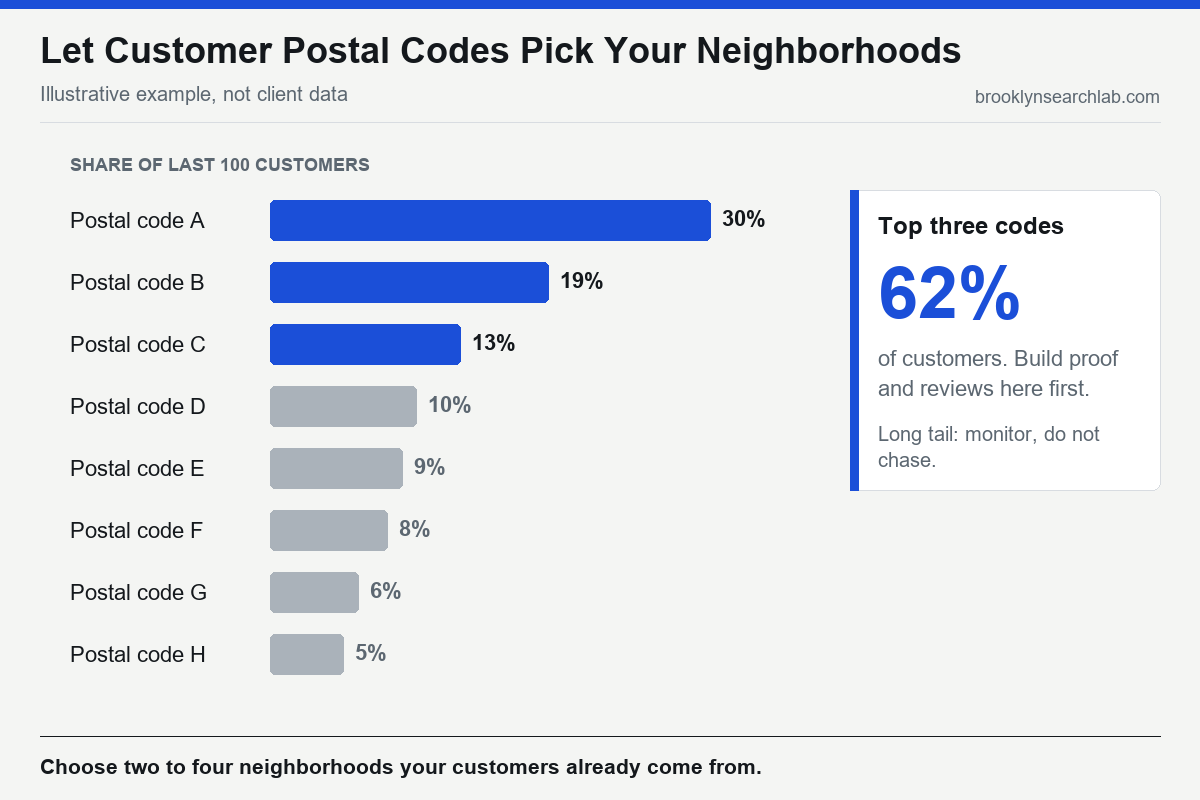
Most advice treats neighborhood targeting as a keyword exercise: list every neighborhood, build a page for each, wait. The better method starts with data you already own. Pull the postal codes of your last hundred paying customers and count them. The distribution will usually be lopsided, with a small number of codes producing most of the revenue. Those are your neighborhoods, and they are the ones where your address, reviews, and reputation are already doing the most work.
Then measure honestly. In Google Search Console, filter queries for the neighborhood names you care about and watch impressions and position over time. Search from different corners of your service area, not just from your desk, and note where you appear and where you vanish. The gaps tell you where distance is beating you, and where the fix is a better profile, more reviews from that area, or simply accepting that a competitor is closer.
This is also why a multi-location business should not copy one set of neighborhood pages across branches. Each location is ranked on its own distance from the searcher, as we explain in why multi-location businesses lose to single-location competitors.
- Google ranks local results on relevance, distance, and popularity, and distance is measured from the searcher, so the same search can return different results a few blocks apart.
- Neighborhood names are informal and have no official borders, so use postal codes for precise service areas and keep your real address and name consistent.
- Do not add a neighborhood to your profile name, and do not publish template pages with the neighborhood swapped in.
- A neighborhood page must contain something specific to that place, such as real projects, local constraints, and reviews from residents.
- Choose two to four neighborhoods from your customers’ postal codes and measure position from several points, rather than chasing every neighborhood.
What to do this week
- Export the postal codes of your last hundred customers and rank them by count.
- Search your main service from three corners of your service area using Google Maps, and record who ranks first at each.
- Check that your profile name matches your signage and website exactly, with no neighborhood added.
- Compare your name, address, and phone number across your top ten directories and fix any mismatch.
- Open Search Console and filter queries for the two neighborhood names where you most want to rank.
- Review any existing neighborhood pages and apply the swap test; rewrite or remove the ones that fail.
Common questions
Can I rank in a neighborhood where I have no address?
You can appear in organic results with strong, specific content, and service-area businesses can appear in nearby searches, but for the map pack a competitor with an address closer to the searcher has a structural advantage. Treat addresses as the starting point and choose neighborhoods near yours.
Should I add neighborhood names to my business name?
No, unless that is the name you genuinely use in the real world on signage and stationery. Google’s guidelines require your name to reflect your real-world name, and adding keywords risks suspension.
How many neighborhood pages should I have?
As many as you can make genuinely different, which is usually fewer than you expect. Start with the two to four neighborhoods your customers actually come from.
Do postal codes work better than neighborhood names?
For service areas in your profile, yes, because they are unambiguous. On your website, use both: the neighborhood name people search and the postal code people write on forms.
We’ll map your customers against your search visibility from several points across your service area and tell you where the real opportunities are. Get your free audit
Related: Why Your Google Business Profile Ranks #1 in Brooklyn but Disappears in Manhattan