
Our own Google listing spent its first weeks as a service-area business with the address hidden. That was the correct setup at the time. It also meant the map pin sat roughly three miles from our actual office, and we could not work out why until we understood what hiding an address actually does.
The storefront versus service-area choice looks like a single toggle during setup. It is the decision that determines where your map pack rankings are measured from, how you get verified, and which rule most commonly gets listings suspended.
Most businesses pick wrong, and nothing tells them.
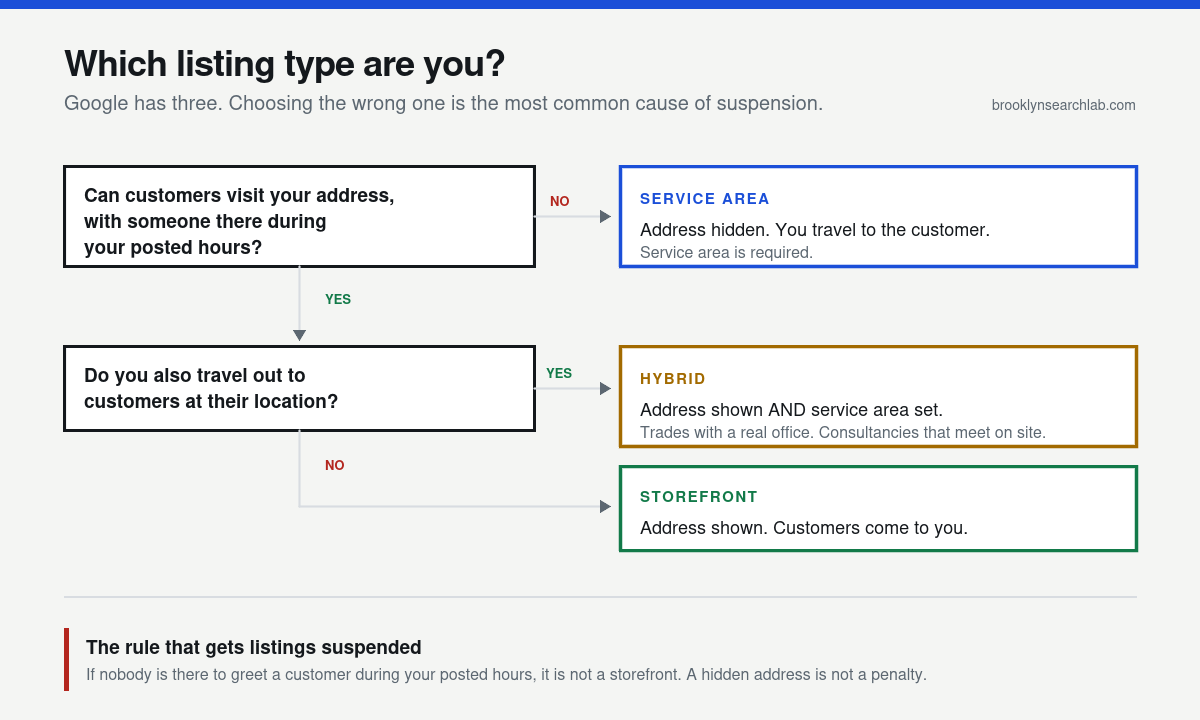
Google has three listing types, not two
A storefront has an address customers visit. A retail shop, a dental practice, a restaurant.
A service-area business travels to the customer. A plumber, a mobile locksmith, a consultant who works from home. The address is hidden and you define the areas you cover, which Google documents under managing your service areas.
A hybrid is both. Customers can visit, and you also travel out. A trades business with a real office, or an agency that meets clients on site. The address shows and a service area is set.
The rule almost everyone gets wrong
Google’s guidelines for representing your business are specific about this, and the wording matters: you may only list an address where you are staffed during your posted hours.
Not an address you own. Not an address where you sometimes work. An address where a customer arriving during the hours on your listing would find someone able to serve them.
That single sentence disqualifies most of the addresses people list. A home office where you take calls but never meet clients is not a storefront. A coworking desk is not a storefront. A warehouse where you store equipment but nobody sits is not a storefront.
This is the most common cause of suspension we see. A business lists a home address to look established, does not staff it, and the listing gets pulled during a routine review or after a competitor reports it. Google’s reinstatement process exists, but it is slow, and rankings rarely return to where they were.
What actually changes
Where the map pack measures distance from
This is the consequence nobody mentions, and it is the one that cost us weeks.
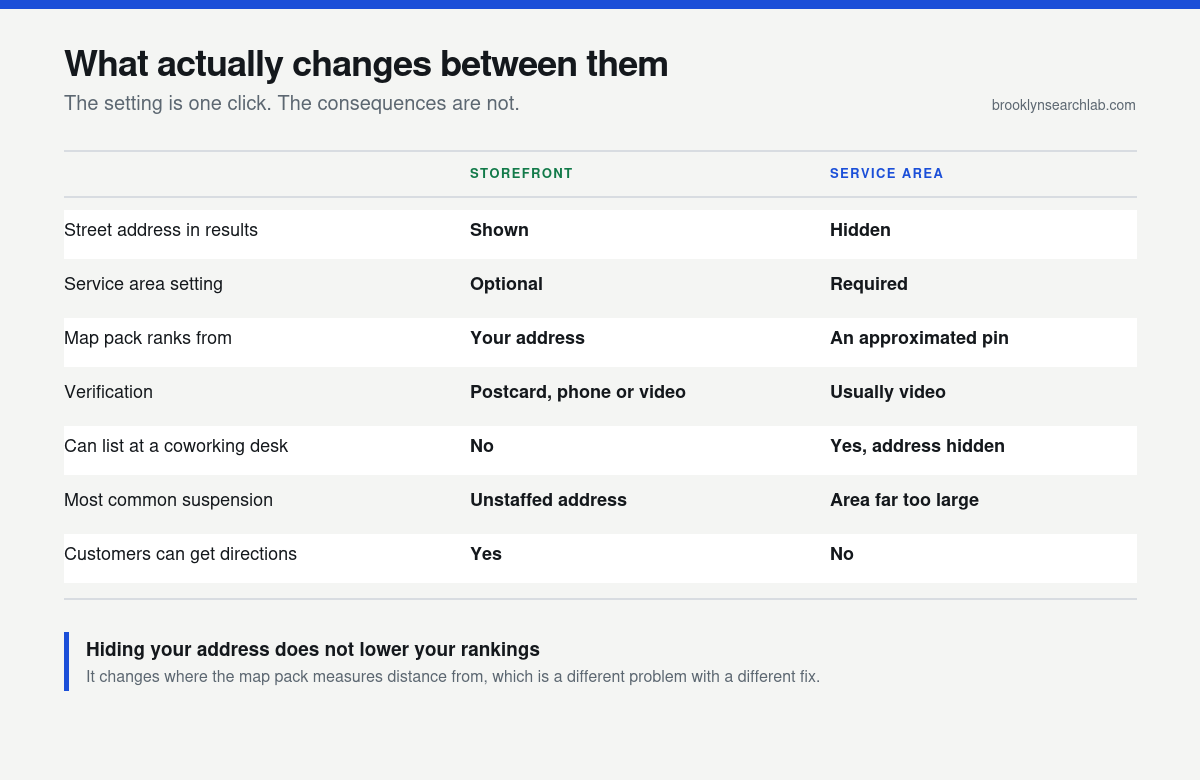
A storefront ranks from its actual address. A service-area business ranks from an approximated pin Google places to obscure the hidden address. That pin is not your building. It can sit a considerable distance away.
Because proximity is the local ranking factor you cannot optimise around, an approximated pin moves the centre of your entire ranking radius. You are not penalised. You are measured from somewhere else.
How you get verified
Storefronts can usually verify by postcard, sometimes phone or email. Service-area businesses are typically pushed to video verification, where you walk Google through evidence that the business is real: signage, equipment, tools of the trade, proof you operate where you claim.
Video verification is stricter and fails more often. Prepare for it rather than discovering it mid-recording.
Whether customers can get directions
A hidden address removes the directions button. For a plumber that is irrelevant. For anyone customers might visit, it is a real conversion loss, and it is worth weighing before choosing the safer-looking option.
Why this is harder in New York
Two things make the choice more consequential here than almost anywhere.
Density compresses everything. In Manhattan there may be forty businesses in your category within one square mile. When an approximated pin shifts your measuring point by even half a mile, you move past dozens of competitors in the wrong direction. In a low-density suburb the same shift changes almost nothing.
Home-based businesses are the norm. A large share of NYC consultancies, trades and agencies run from apartments. That means service-area is genuinely the correct setup for most of them, and the temptation to list the apartment as a storefront to look bigger is exactly the mistake that gets listings suspended.
It also compounds with borough addressing. If you are in Brooklyn, Queens, the Bronx or Staten Island, your listing should use the borough rather than “New York, NY”, and that has to match what your service area implies.
What switching actually looks like
We moved our own listing from service-area to a published address, and the process is worth describing because almost nobody documents it.
You change the address setting in Business information and it does not take effect immediately. The listing enters a pending state where your dashboard shows the new address while the public listing still shows the old configuration. That gap is the part that catches people out: you can look at your own admin panel, see the address sitting there, and assume it is live when customers still cannot see it.
Google may then re-verify. For a previously hidden address that usually means video, occasionally a postcard. Until it completes, the public listing keeps the old setup.
The practical consequence is sequencing. If you publish an address on your website, your schema markup and thirty directory listings while Google still shows a hidden address, you have manufactured exactly the NAP inconsistency you were trying to avoid. Wait until the listing shows the address publicly, then update everything else to match it.
We deliberately left the street address off this site until the change went live, which felt wrong at the time and was the right call.
What a service area does not do
The most persistent misunderstanding is that setting a wide service area extends where you can rank. It does not.
Your service area tells customers where you are willing to work. It is displayed information. It is not a ranking instruction, and adding boroughs does not widen the radius in which your listing appears in the map pack. That radius is governed by how close the searcher is to your pin.
This matters because the inflated service area is the classic service-area suspension trigger. A one-person operation claiming all five boroughs plus Westchester and Long Island gains nothing in rankings and gives a reviewer an obvious reason to act.
Set it to where you would genuinely travel for a job. Then win the areas outside your pin’s reach with organic location pages instead, where proximity does not apply.
If the temptation is to solve it by opening more pins, read why multi-location businesses keep losing to single-location competitors on Google Maps first. Extra listings without extra genuine locations make the problem worse.
Key takeaways
- Staffed during posted hours is the test. Not owned, not occasionally used. If nobody would greet a customer, it is not a storefront.
- Hiding your address is not a penalty. It changes where distance is measured from, which is a different problem.
- A service-area pin is approximate, and can sit some distance from your actual location. Ours was about three miles out.
- Service-area businesses usually face video verification, which is stricter than postcard.
- Hybrid exists. If customers can visit and you also travel, use it rather than forcing a choice.
- Getting it wrong is the most common suspension cause, and reinstatement rarely restores previous rankings.
What to do this week
- Answer the staffing question honestly. During your posted hours, would someone arriving be served? If not, you are a service-area business.
- Check what your listing currently says. Business Profile, Business information, Location. Confirm whether the address is shown or hidden and whether that matches reality.
- If you are service-area, check the pin. Search your business on Google Maps and see where it sits. If it is far from where you actually work, that is your ranking centre.
- Right-size your service area. Listing every borough when you realistically serve two is the most common service-area suspension trigger. Google’s local ranking guidance gives you nothing for an inflated radius.
- If you are switching to a storefront, expect re-verification. Publishing a previously hidden address usually triggers review. Plan for a few days where the change is pending.
Common questions
Does hiding my address hurt my rankings?
Not directly. It changes where the map pack measures distance from, because Google uses an approximated pin instead of your building. That can be worse, better, or neutral depending on where the pin lands relative to your customers.
Can I list my home address if I run the business from home?
You can register it, but it should be hidden unless customers actually come to your home and someone is there during posted hours. For most home-based businesses, service-area is the correct and safe setup.
What happens if I choose wrong?
Usually nothing for a while, then a suspension during a routine review or after a competitor report. That is what makes it dangerous: the wrong setup works fine right up until it does not, and by then you have built rankings on it.
Can I switch later?
Yes, and it is common as businesses take real premises. Expect re-verification, and expect a period where the change shows as pending. We went through exactly this on our own listing.
How large should my service area be?
Where you would genuinely travel for a job, not where you would like customers to be. Google caps the radius, and an inflated area does not extend your reach. It only increases suspension risk.
Does a service area affect where I can rank?
Less than people expect. Service area tells customers where you work. It does not extend your map pack radius, which is governed by proximity to the searcher. That is why we build separate location pages for boroughs where the map pack is out of reach.
Not sure which one you should be?
The free audit includes a listing review: whether your type is set correctly, where your pin actually sits, whether your service area is realistic, and what would happen if Google reviewed you tomorrow. Five business days, no obligation.
Related: Google Business Profile optimization, SEO in Brooklyn, SEO services.